
SportsTimer Pro
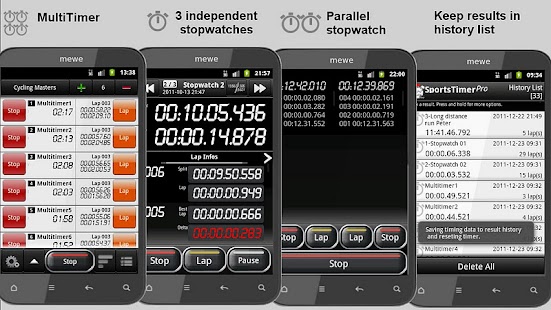
Diese bietet nun bis zu 100 Stoppuhren im MultiTimer Modus statt 12 in der PRO App.SportsTimer PRO bietet unterschiedliche Stoppuhren für ihre Aktivitäten.
Zum Testen existiert eine Lite-Version im Android Market!
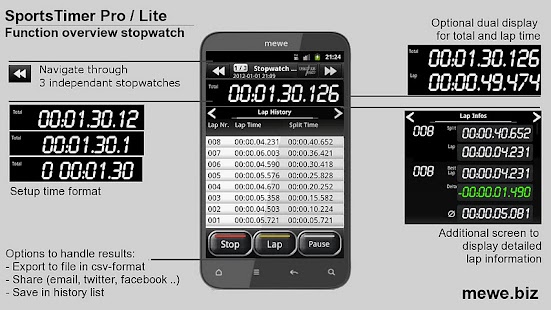
LAPTIMER ist Ihre Stoppuhr für einen einzelnen Athleten.Stoppen Sie alle Rundenzeiten.
Sie sind über die Performanz jeder Runde informiert.
Diese Stoppuhr kann in jeder Situationen gut kontrolliert werden, weil diese über ein optional einstellbares taktiles Feedback und zusätzliche Steuerung durch die Lautstärketasten verfügt.Am Ende des Ereignisses sind alle Rundenzeiten abrufbar, speichern sie das Resultat in der Datenbank, senden Sie den vollständigen zeitlichen Verlauf an Ihre Freunde oder speichern Sie diesen auf der SD-Karte.
Das Dateiformat unterstützt eine detaillierte Analyse in Excel.
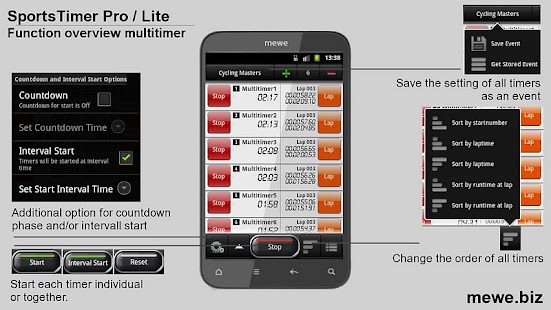
MULTITIMER ist Ihre Renn- / Veranstaltungs- Stoppuhr.Diese unterstützt die gleichzeitige Aufnahme von Zwischen-und Ergebnissen von bis zu zehn Teilnehmer / Sportler.Vor dem Start konfigurieren sie die Anzahl und Namen der Teilnehmer durch Texteingabe oder direkten Import aus CSV-Datei.Sie können jeden Sportler individuell, das ganze Ereigniss zur gleichen Zeit oder in einem Startabstand starten.Während der Veranstaltung sind sie sofort über den Zwischenstand mit der Hotlist-Funktion informiert.Dokumentieren Sie Ihre Ergebnisse durch den Export der Zwischen-und Endergebnisse auf die SD-Karte im CSV-Format oder speichern sie diese in der Datenbank (history list).
Setzen sie bei ihrem nächsten Sportereigniss SportsTimer PRO mit seinen vielseitigen Funktionen ein.
Funktionsmerkmale:
LapTimer - 3 unabhängige Stoppuhren - Einfacher Wechsel zwischen 3 Stoppuhren - Aufzeichen von Zwischen- und Endresultaten - (Fast) unbegrenzte Anzahl von Runden - Zeigt das Delta zur besten Runde Optionen: - Vibrationen bei Tastendruck - Steuerung der Stoppuhr auch über Lautstärkesteuerung - Verschiedene Layouts für Portrait- und Lanschaftsmodus
Parallel Timer - bietet 2 simultane StoppuhrenMultiTimer- Generell - Aufzeichen von Zwischen- und Endresultaten von bis zu 12 Teilnehmern gleichzeitig- Organisation der Teilnehmer - Namenzuweisung der Teilnehmer über - Texteingabe oder - Import von Event Name, Teilnehmer Name und Startnummer über CSV-Datei oder - Auswahl über Kontakte - Speicherung als Event - Klassifizierung des Events über 3 Labels - Ergebnisspeicherung in CSV-Datei enthält alle Informationen über Event, Datum und Teilnehmername(n)- Zeitmessung - Startoptionen - Manueller Start jedes Teilnehmers - Gleichzeitiger Start aller Teilnehmer - Automatischer Intervallstart aller Teilnehmer - Automatischer Intervallstart der Teilnehmer in Gruppen (Wave-Start) - Optionaler Countdown vor Gesamt- / Intervallstart - Aufzeichen von Zwischen- und Endresultaten von bis zu 12 Teilnehmern simultan - Hotlist-Funtktion zeigt die Rangliste aller Teilnehmer für jede Runde und für Endergebnisse
-Interfaceoptionen - Vorgabe der Bildschirmorientung - Startbildschirm festlegen
- Ausgabe der Ergebniss - Ergebnisse speichern auf SD Card im CSV-Format.
Bearbeitung in z.B.
Excel ist somit auch möglich.
- Share der Ergebnisdaten in Textformat ermöglicht u.a.
den Versand per email.
- Speichern in interner Datenbank (bis zu 1000 Resultate)
About SportsTimer Pro
- Package name (App ID)
- biz.mewe.mobile.sportstimerpro
- Available on
- Google Play
- Price
- $2.99
- Developer
- mewe
Looking for the SportsTimer Pro APK?
The safest way to get SportsTimer Pro (biz.mewe.mobile.sportstimerpro) on your Android device is to install it directly from Google Play — you'll always get the latest official version, automatic updates, and no risk of modified or infected APK files from third-party sites.

Social Features
Connect and share with friends and the community.
Camera Features
Advanced camera features with editing capabilities.
Financial Tools
Manage your finances and track your expenses easily.
SportsTimer Pro in Aktion sehen
Was unsere Nutzer sagen
Verlassen Sie sich nicht nur auf unser Wort. Hier ist, was unsere Nutzer ueber diese Android-App sagen.
"Had this Multi stopwatch for many years. Sadly it no longer works properly with Android 8.0. Please update."
"Lap column heading is over the total time and total time heading is over lap time."
"This app has made my life as an Indoor Track coach SO much easier, especially when I have multiple people in one distance event. Well done. Only add would be to be able to video as you go"
"Best stop watch on the app store.... By far..."
"Unsure why, app was purchased before. Issues with Note 4. Will rate better if bugs are worked out."
"The text file separates minutes and seconds with a decimal instead of a colon. hh:mm.ss.000. This means all of the values need to be changed in excel to do any calculations. Should be: hh:mm:ss.000 Works great otherwise."
"Same as others, running on galaxy note 10 tablet and note 4 phone, everything works great until "stopped working" pops up and closes the app, usually when backing out 1 screen"
"Constantly displays "stopped working" message when reverting back to previous pages, shouldn't happen with a paid app. And this developer has been completely unresponsive too the problem. Wouldn't recommend purchase."
"It would be great to be able to set the race clock after the race has started. Adding a bib logger or select timing feature would also be great but very functional."
"I like that I can take multiple times and get splits for each. I also like the fact that I can save the results, however, when reviewing the results the app crashes and restarts. Pretty annoying guess it doesn't work right on G3s. Please fix"
Frequently Asked Questions
Is SportsTimer Pro free?
SportsTimer Pro is a paid app — it costs $2.99 on Google Play. You pay once through your Google account and can install it on your Android devices.
How do I install SportsTimer Pro on Android?
Open Google Play on your Android phone or tablet, search for SportsTimer Pro by mewe or tap the Google Play button on this page, then tap Install. The app downloads and installs automatically.
What is biz.mewe.mobile.sportstimerpro?
biz.mewe.mobile.sportstimerpro is the App ID (package name) of SportsTimer Pro on Google Play. Every Android app has a unique package name, and it is the safest way to verify you are installing the official app.
Is SportsTimer Pro safe to download?
Installing SportsTimer Pro from Google Play is the safest option: you get the official version published by mewe, verified by Google Play Protect, with automatic updates. Avoid APK files from unofficial third-party sites.

Get SportsTimer Pro Today
SportsTimer Pro for Android — $2.99 on Google Play.
Compatible with Android phones and tablets — available on Google Play.
Frag die KI zu dieser App
Erhalte sofortige Antworten zu Funktionen, Tipps und mehr.